Download Huddix
Install the desktop app on your Mac or Windows PC to capture supported desktop-call audio. Sign in to save recordings and use Huddix features.
macOS (Apple Silicon)
For M1, M2, M3, M4 Macs
Latest Huddix release
Huddix-arm64.dmg · ~95 MB
Download for macOSChoose your Mac
MACOS INSTALLATION
Open Huddix safely on your Mac
macOS may show a security warning for this preview build. Follow these steps once; you will not need to repeat them after Huddix has been allowed.
- 1
Install the app
Open the downloaded DMG, then drag Huddix into your Applications folder.
- 2
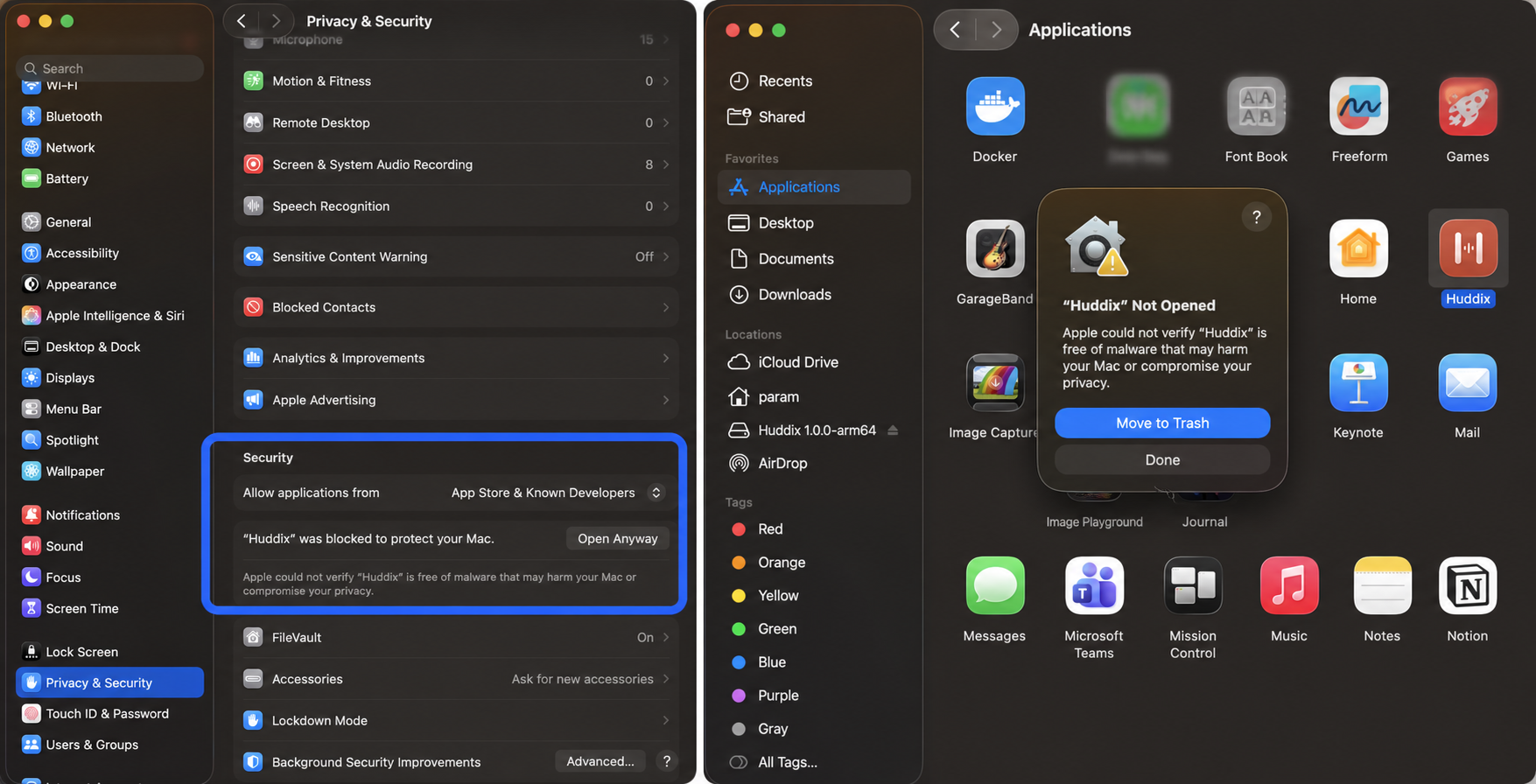
Try opening Huddix once
Open Applications and double-click Huddix. If macOS displays a warning with an Open button, choose Open.
- 3
Allow it in Privacy & Security
If the warning only offers “Move to Trash,” select Done. Then open System Settings → Privacy & Security, scroll to Security, and click Open Anyway next to the Huddix message. Confirm Open when macOS asks again.
Still blocked? Download the ZIP build, extract it, move Huddix to Applications, and repeat step 3.